Lesson 1 of 14 · 28 min read
Start: a first session that changes code safely
Install Claude Code, check out the demo shop at its first tag, ask orienting questions about one service, make one small change, read the diff before you keep it, and undo it with /rewind.
Code: clone shop-workspace and run its setup.sh, which clones the other four repositories into it:
git clone https://github.com/mapell-dev-shop/shop-workspace
cd shop-workspace && ./setup.sh
This lesson runs from the tag lesson-01-start to lesson-01-end.
This chapter starts at the tag lesson-01-start. It needs Git, a terminal, Claude Code with an account that has access, and uv if you run the service's tests. It does not need Kafka, a running shop, or a GitHub copy of the repositories. If a live demo goes wrong,
./checkout-lesson.sh 01 --endjumps every repository to the tag lesson-01-end.
This chapter was recorded on Claude Code 2.1.295 in October 2026. Documented defaults, limits, and labels are as of that month and may have changed since.
Where a claim matters, the sentence itself says where it comes from: the documentation, a recorded run, or me. A later section of this chapter defines the three.
1. What Claude Code is and where it runs
In my view, Claude Code is something you use to ask questions about a repository and to have it edit files in that repository, during a session that you steer. The rest of this chapter shows exactly that in orders-service.
The course names four surfaces: the terminal, an IDE, desktop, and web. The documentation says the command-line interface (CLI) works with every provider, and that Desktop and cloud sessions need a claude.ai subscription. I make no claim about how the web surface relates to cloud sessions or about what an IDE needs. Check the current documentation before relying on either.
The recordings this course is built on were made in a terminal. The text therefore assumes the terminal, and every command and slash command in this chapter is one you type there. The other three surfaces are named here and not described.
2. Installing Claude Code and getting access
The install and access facts in this section can change. Each one rests on the documentation and is paraphrased from it.
The documentation recommends the native installer, and in my view that is the right choice. The documentation says the native installer auto-updates, and that installs through Homebrew and WinGet do not, so with those two you update Claude Code yourself. Follow the official setup page for the steps on your operating system.
The documentation says Claude Code needs a Pro, Max, Team, Enterprise, or Console account, and that the free plan is excluded. The CLI works with every provider, as the previous section notes. Account features and prices are outside this course.
The npm route is where two official pages differ. The anthropics/claude-code README says installation via npm is deprecated, and the setup page still lists an npm route without that label. I do not decide between the two pages. In my view, sidestep the question and use the native installer.
Activity 1 has you write down your own route, its update behavior, and your account type.
3. The demo system and its tags
The demo is a small shop in five repositories in github.com/mapell-dev-shop: shop-workspace, contracts, orders-service, inventory-service, and payments-service. These are facts about the demo, not about Claude Code.
shop-workspace holds the scripts that run the course. setup.sh clones the other four repositories into it, and checkout-lesson.sh moves all five between lesson states. It also holds the Docker Compose file with a single-node Kafka and the scripts that run the shop. contracts holds the event schemas, the event envelope, and the Kafka helpers. orders-service, inventory-service, and payments-service are FastAPI services that use SQLAlchemy, Alembic, SQLite, pytest, ruff, and mypy. Their unit tests use a fake broker, and Kafka is needed only for the end-to-end flow.
Every demo state is a pair of Git tags, lesson-NN-start and lesson-NN-end, in all five repositories. This chapter is lesson 01, so its tags are lesson-01-start and lesson-01-end. Both commands run from shop-workspace. Run the first now and keep the second for jumping to the end state. The first puts every repository at lesson-01-start, the state this chapter begins in:
./checkout-lesson.sh 01The second is only for jumping every repository to lesson-01-end, which is the route back when a live demo goes wrong:
./checkout-lesson.sh 01 --endIf the other four repositories are not on your machine yet, run setup.sh once from shop-workspace first.
In my view, start with a clean working tree in every repository before you run the checkout script. How the script treats uncommitted changes is not documented here, so commit or stash anything you want to keep first.
The block at the top of this chapter is the pattern every chapter follows: the starting tag, what the chapter needs, and the jump to the end tag. For this chapter the needs are Git, a terminal, Claude Code with account access, and uv if you run the tests of orders-service with uv run pytest -q. It needs no Kafka, no running shop, and no GitHub copy, because every step happens in the five checked-out repositories on your machine.
Presenter note:
--endis the recovery route when a live demo goes wrong, and a presenter can teach this chapter on its own.
Activity 2 walks you through the steps.
4. How this course labels documented, recorded, and inferred claims
The course uses three kinds of claim, and the sentence itself says which kind it is.
The documentation says marks documented behavior: what the current official Claude Code documentation states. I paraphrase it, so no quotation marks surround documentation wording. The note at the start of this chapter covers volatile facts such as defaults, limits, and labels.
In the recorded run marks recorded-run behavior: what happened in the lesson recordings this course is built on. Every lesson was run twice, as a discovery run and a recording run. I name the run when it matters and report the differences between them. A recorded run shows what happened in this demo on one version. It does not show how Claude Code is documented to behave. Where I quote a label from a recorded run, it appears in single quotes.
In my view marks everything I add myself, both the conclusions I draw that neither the documentation nor a run states and my advice about what to do.
These are the three phrases for the three kinds. A claim that rests on another named source, such as a plugin's own files, a third-party README, or another tool's documentation or source, names that source in the sentence. I keep the documentation says for the official Claude Code documentation alone.
The recorded runs were made on Claude Code 2.1.295. That version is the recorded baseline, and this text states no current version. The same runs used Opus 5.5 as the model, effort set to medium, and auto mode, in a clean profile. In the recorded run nothing was installed, so there is no recorded install to compare with the documented install facts. Your own session may differ from the recording.
Model output is not guaranteed. Prompts appear here as they were typed in the recordings. I describe responses as what happened in a run, and I give the differences between the two runs where they matter.
The rewind material in this chapter shows all three kinds side by side.
| Kind | Phrase | Example from the rewind material |
|---|---|---|
| Documented | The documentation says | Checkpoints do not track files modified by Bash commands. |
| Recorded | In the recorded run | Claude edited through Bash in the discovery run, the menu showed 'No code changes' and only the conversation went back. |
| Mine | In my view | After a rewind, run git status and tell Claude the current state of the code. |
Activity 8 at the end of the chapter lets you practice the three labels.
5. First questions about orders-service
Keep this phase to questions, with no requests to edit anything.
Start from the orders-service directory with lesson-01-start checked out and a clean working tree. The recording began with two commands in the shell:
claude --version
claude
Run the first to see which version you are using, so that you can compare it with the recorded baseline, 2.1.295.
The recording then typed two prompts:
What does this service do? Give me a short tour of the code.How does an order end up REJECTED? Show me the code path.Your answers may differ from any answer in the recording, because model output is not guaranteed. The code is your reference, not a transcript.
Four to six questions are enough. Besides those two, ask where an order is created and what state it starts in, how the code is laid out, what the service uses for persistence and migrations, how its tests run, and what to be careful with when changing it. The demo gives you facts to check against: orders-service is a FastAPI service with SQLAlchemy, Alembic, SQLite, pytest, ruff, and mypy, and an order starts as PENDING and publishes OrderPlaced. These are demo facts, not Claude Code behavior.
In my view, treat every answer as a lead to check, not as a fact. If an answer names a file, open it. If it suggests a command, run it. Ask one thing per question so that each answer is easy to check, and keep a log that separates confirmed answers from unverified ones.
Activity 3 sets out the log.
6. One small change and reading the diff
In this course, accepting a change means deciding to keep it after you have read the diff, either by leaving it in the working tree or by committing it locally.
In my view, a good first change is one you can review in a minute or two: one file or one behavior, checkable by reading it or with the service's tests. A message text, a comment or docstring, or one small validation fits. The recorded change adds a created_at field to an existing response, with a test. The recording typed this prompt:
GET /orders/{id} should also return when the order was created. Add created_at to the response, with a test.The prompt states the outcome (the endpoint returns when the order was created), where it belongs (the response of GET /orders/{id}), and a condition (a test). A request with those three parts gives you something concrete to check the diff against.
The recording then typed two commands at the Claude Code prompt, with a leading exclamation mark:
!git diff --stat
!uv run pytest -q
The first lists the files changed and the second runs the tests of orders-service. You can run the same commands without the exclamation mark in a second terminal in the orders-service directory. Run the tests before you ask for the change as well, so that you have a baseline.
git diff --stat is a first look. Before you decide, read the whole diff. In my view, this is the checklist to apply:
- The files touched match what you asked for.
- Nothing unrequested is in the diff.
- There is no unrelated formatting churn.
- New files are accounted for.
git diffomits untracked files, so checkgit statusas well. - The tests pass before and after.
- It is a change you would accept from a colleague.
In my view, review the diff and not Claude's summary of it. A summary tells you what Claude says it did. The diff shows what is in the files, whichever way the edit was made.
Activity 4 has you make one change and write the review note.
7. Undoing a change with /rewind
Undo the change with /rewind. The documentation says /rewind has two aliases, /checkpoint and /undo, and that checkpoints are not a replacement for version control. In my view, keep Git as your baseline undo.
In the recording, the session ran /rewind and chose the message that asked for the change, the one beginning GET /orders/{id} should also return. What the menu offered depended on how Claude had edited the files.
When Claude edited with the Edit tool, the menu showed code changes for that message and offered 'Restore code and conversation'. Choosing it restored the code. The recording then typed !git status --short. The written notes for the recording give an empty result as the expected output of that check. They do not record what it printed.
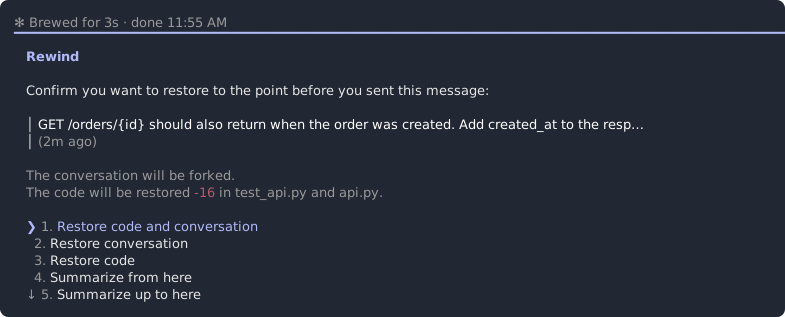
In the discovery run Claude edited the files through Bash. The menu showed 'No code changes' and offered only 'Restore conversation'. Choosing it put the conversation back, and !git status --short still listed the two changed files. The recording then typed !git restore . and !git status --short again. The written notes give an empty result as the expected output of that second check. They do not record what it printed.
In the recorded run, after a rewind Claude did not know what had happened after that point. In my view, tell Claude the current state of the code, or have it read the file again, before you continue. Also in my view, check with git status and git diff after every rewind and trust them over the menu, because they show the files themselves.
Activity 5 has you rewind your own change.
8. What checkpoints do not track
The documentation says checkpoints do not track files modified by Bash commands, that subagent edits are usually not restored, and that external edits and symlinked or hard-linked files are skipped. It also says that only the 100 most recent checkpoints are kept and snapshots are swept about 30 days after the last save.
The recorded Bash case is one run. In the discovery run, Claude edited through Bash, the menu showed 'No code changes', only the conversation went back, and git restore was needed. That agrees with the documented limit on Bash commands. In a recorded run where Claude used the Edit tool, /rewind restored the code. What /rewind restored in lesson 01 depended on how Claude edited, and you cannot be sure in advance how it will edit, so both outcomes are possible.
In my view, use an undo ladder with three rungs. Each rung pairs a tool with a case it covers and a case it does not.
/rewindcovers edits that Claude made with the Edit tool. It does not cover files changed by Bash commands.git restoreorgit checkoutcover tracked files, whichever way the change was made. They do not remove new untracked files, so checkgit status.git restore .also discards unstaged edits of your own, so look atgit statusbefore you run it../checkout-lesson.shcovers the demo: it puts the five repositories at a tagged state. It does not cover a repository outside the demo.
Use the first rung that covers the change.
Activity 6 tests the first rung against a Bash edit.
9. Where the chapter ends: lesson-01-end
The tag lesson-01-end marks the state at which the lesson 01 recording finished. It is not an answer key for your session: your change was scratch work, and by now orders-service is back at the lesson-01-start working tree.
Leave the Claude Code session the way the recording did: type /exit, then exit. Then, in orders-service, read the difference between the two tags. This is read-only:
git diff lesson-01-start lesson-01-endActivity 7 has you write down what the end tag contains compared with the start tag.
If a live demo goes wrong, run ./checkout-lesson.sh 01 --end from shop-workspace and every repository is at lesson-01-end.
You are at the end state when git tag --points-at HEAD lists lesson-01-end in each of the five repositories.
Activity 1: Check your install route and account, and date what you find
This exercise applies the install and access facts from the install section to your own setup and dates them. You start with Claude Code installed or about to be, and an account to sign in with. No repository changes.
Steps:
- Find out how Claude Code reached your machine. If you have not installed it, pick a route, with the native installer as the default.
- Write down whether your route updates itself and what you must do to update, as the install section states it.
- Confirm that the account you sign in with is a Pro, Max, Team, Enterprise, or Console account and not the free plan.
- Write a three-line setup note with the route, the update behavior, and the account type. End each line with the date on which you checked it.
- If your route is npm, add a line saying that the README labels npm installation deprecated while the setup page lists an npm route without that label.
You should end with:
A three-line setup note with the route, the update behavior, and the account type, each line ending with the date on which you checked it. This is the shape of the note, with an example (yours will differ):
Install route: native installer, checked <date>
Updates: automatic, checked <date>
Account: Pro, checked <date>
Hints:
- The recorded sessions installed nothing, so there is no recorded install to compare with.
- Leave account features and prices out of the note. They are outside this course.
- If you cannot tell how Claude Code was installed, say so in the note and treat updates as manual until you have checked.
Check yourself:
- The note names one route and its update behavior as the documentation gives it. Compare with the install section: the native installer auto-updates, and Homebrew and WinGet installs do not.
- Every volatile fact in the note is dated. Each of the three lines ends with the date on which you checked it.
- The account type is one the documentation lists. It is Pro, Max, Team, Enterprise, or Console, and the free plan is not used.
Activity 2: Check out lesson-01-start, jump to lesson-01-end, and come back
This lab practices the tag mechanics: reach the start state, jump to the end state, and come back. The git commands here are a reader check, not Claude Code behavior. You start with shop-workspace on your machine.
Steps:
- Run setup.sh once from shop-workspace if the other four repositories are not on your machine yet.
- Make sure the working tree is clean in all five repositories.
git status --shortshould print nothing. Commit or stash anything you want to keep. - From shop-workspace, run
./checkout-lesson.sh 01. - In each of the five repositories, run
git tag --points-at HEADand note whether lesson-01-start is in the output. Record the result. - From shop-workspace, run
./checkout-lesson.sh 01 --end. Repeat the check in each repository for lesson-01-end and record the result. - Run
./checkout-lesson.sh 01again to return to lesson-01-start, and confirm it in orders-service.
You should end with:
All five repositories at lesson-01-start, and a record with five rows, one per repository:
| Repository | Tag at HEAD after the start checkout | Tag at HEAD after the --end jump |
|---|---|---|
| shop-workspace | ||
| contracts | ||
| orders-service | ||
| inventory-service | ||
| payments-service |
Hints:
- shop-workspace holds the script, so run it from there.
- Commit or stash local work first. How the script treats uncommitted changes is not documented here.
- Any Git command you already know that shows the tags at HEAD will do.
Check yourself:
- All five repositories are at lesson-01-start after the first checkout. Git shows lesson-01-start pointing at HEAD in shop-workspace, contracts, orders-service, inventory-service, and payments-service.
- All five repositories are at lesson-01-end after the --end jump. Git shows lesson-01-end pointing at HEAD in all five.
- You finish back at the start state. After the final checkout, orders-service has a clean working tree at lesson-01-start.
Activity 3: Ask orienting questions about orders-service
This lab builds the habit of asking read-only questions and checking the answers before you change anything. You start with orders-service at lesson-01-start with a clean working tree.
Steps:
-
Start Claude Code from the orders-service directory with
claude. The recording began withclaude --versionand thenclaude. -
Ask four to six questions, one at a time. Draw them from the categories in the chapter: purpose, where an order is created and its starting state, layout, persistence and migrations, how the tests run, and what to be careful with when changing it. Two of them can be the recorded prompts:
What does this service do? Give me a short tour of the code.How does an order end up REJECTED? Show me the code path. -
Make no edit requests.
-
For each answer, write the question, a one-line summary of the answer, how you checked it, and a verdict: confirmed, wrong, or could not verify.
-
Check at least two answers yourself, by opening the file the answer names or by running the command it suggests, including the test command if you asked about tests.
-
Compare your questions with the two recorded prompts and note where they differ.
You should end with:
The same clean working tree, plus a question log with four to six rows and four columns: question, one-line answer summary, how checked, verdict.
Hints:
- Ask one thing per question so each answer is easy to check.
- Differences from the recorded session are expected, because model output is not guaranteed.
- Do not paste long transcripts into the log.
Check yourself:
- At least two answers were checked against the code or by a command. The log has at least two rows whose how-checked column names a file you opened or a command you ran.
- Nothing in the repository changed.
git statusin orders-service shows a clean working tree after the session. - The log separates confirmed answers from unverified ones. Every row has a verdict, and any could-not-verify row says why.
Activity 4: Make one small change and review the diff before keeping it
This task practices asking for one small change in orders-service and deciding on it from the diff, not from Claude's summary. You start with orders-service at lesson-01-start with a clean working tree and your question log.
Steps:
-
Use your question log to pick one change that meets the criteria in the chapter. Write one sentence naming the intended change and the file or files it should touch. You can use the recorded change, adding created_at to the response of GET /orders/{id} with a test, or pick your own.
-
Run the service's tests with
uv run pytest -qand record the result as a baseline. -
Ask Claude for the change, stating the outcome and where it belongs. The recording typed this prompt, and you can compare yours with it:
GET /orders/{id} should also return when the order was created. Add created_at to the response, with a test. -
Before keeping anything, read the whole diff yourself. Start with
git diff --statas the recording did, then readgit diff, and usegit statusto catch new files. -
Apply the review checklist from the chapter, then run
uv run pytest -qagain. -
In your diff review note, record keep or discard with one reason. That decision comes from the diff you just read. Whichever you decide, the change stays uncommitted in the working tree for Activity 5, and Activity 5 removes it. Do not commit it and do not push.
You should end with:
- One small change, uncommitted, in the orders-service working tree, whether you decided to keep it or discard it. Activity 5 removes it.
- A diff review note: intended change, files touched, unrequested edits found or none, tests before and after, and the decision with its reason.
- The Claude Code session still open for the next two activities.
Hints:
- A message text, a comment, or one small validation is enough. Do not ask for a refactor.
- If the diff includes edits you did not ask for, discard them or ask Claude to narrow the change. This is where reading the diff pays off.
- Untracked files do not show in
git diff, so checkgit statusas well.
Check yourself:
- The diff touches only the intended files.
git statusandgit difflist the file or files named in your intended-change sentence, or the note records the extras and what you did about them. - The keep or discard decision follows reading the diff. The note records the diff review and the tests before and after, ahead of the decision.
- The change is still uncommitted and nothing was pushed.
git statusshows the change as uncommitted edits in the working tree.
Activity 5: Undo the change with /rewind and verify with Git
This lab practices /rewind on the change from Activity 4 and checks the outcome with Git, not with the menu. You start with your small change in the orders-service working tree and the Claude Code session from Activity 4 still open.
Steps:
- Run
/rewind. The documentation gives /checkpoint and /undo as aliases. Choose the message in which you asked for the change. The recording chose the message beginningGET /orders/{id} should also return. - Take the restore option the menu offers. The recording followed one of two paths, depending on how Claude had edited the files:
- The menu showed code changes for that message and offered 'Restore code and conversation'. The recording chose it, ran
!git status --short, and expected no output. - The menu showed 'No code changes' and offered only 'Restore conversation'. The recording chose it, ran
!git status --short, and still saw the two changed files, then ran!git restore .and!git status --shortagain and expected no output. - If your menu matches neither, record what it shows.
- The menu showed code changes for that message and offered 'Restore code and conversation'. The recording chose it, ran
- Run git status and git diff in orders-service. You can type
!git status --shortat the session prompt as the recording did, or run the commands in a second terminal. Record whether the code was restored or only the conversation went back. - Ask Claude what state the changed file is in and what it did after that point. Record what it says as your own run observation.
- If the code was not restored, restore it with
git restore .and tell Claude the current state of the file before you continue. - Write a short rewind record: what you expected, what Git showed, and what Claude said it knew.
You should end with:
orders-service at the lesson-01-start working tree, and your rewind record: what you expected, what Git showed, and what Claude said it knew.
Hints:
- Either outcome is a valid result. The recorded runs differ: the code was restored after an Edit-tool edit, and in the discovery run a Bash edit gave 'No code changes' with only the conversation rewound.
- Do not repeat the change to get the outcome you expected. Record the one you got.
- Your result is one run. Label it that way in the record.
Check yourself:
- The working tree matches lesson-01-start.
git statusis clean andgit diff lesson-01-startshows nothing in orders-service. - The record is based on Git output, not on the menu. It cites what
git statusorgit diffshowed after the rewind. - Run observation and documented behavior are kept apart. The record marks Claude's answer about its own knowledge as an observation from this run.
Activity 6: Predict and check what checkpoints do not track
This lab lets you test the documented Bash limit on a harmless change, then write down which tool recovers which case. You start with orders-service at the lesson-01-start working tree, clean, with the session open.
Steps:
- Before you run anything, write a prediction from the documented limits: if Claude changes a tracked, low-risk file by running a shell command and you then rewind, what will git show?
- Pick a file where a one-line comment is harmless. In a new turn, ask Claude to make a trivial, non-destructive change to that file by running a shell command, such as appending a comment line. Confirm the change with
git diff. - Run
/rewind, choose the message of that turn, then checkgit statusandgit diff. - Compare the result with your prediction. If the file is still changed, restore it with
git restore .and tell Claude. If it was restored, look at how the edit was actually made before you draw any conclusion. - Write your undo ladder in three lines, marked 'in my view': which tool you use first, which next, which last, and one case each does not cover.
You should end with:
The same clean working tree, plus your written prediction with the observed result, and the three-line undo ladder marked 'in my view'.
Hints:
- Ask for nothing destructive.
- A restored file does not show that the documentation is wrong. Claude may not have edited through Bash.
- The documentation gives the retention figures (100 checkpoints, about 30 days). Use them when you write the limits of the ladder, and note the date on which you checked them.
Check yourself:
- The prediction was written before the rewind. It is dated or ordered before the rewind step in your notes.
- The undo ladder names /rewind, Git, and the checkout script, each with a case it does not cover. It has three entries, and each pairs a tool with a covered case and an uncovered case.
- The working tree is back at lesson-01-start.
git statusis clean in orders-service.
Activity 7: Compare your session with lesson-01-end
This exercise closes the chapter on a state you can check with Git. You start with orders-service clean at lesson-01-start.
Steps:
- Leave the Claude Code session the way the recording did:
/exit, thenexit. - In orders-service, confirm that
git status --shortprints nothing and thatgit diff lesson-01-startshows nothing. - In orders-service, read
git diff lesson-01-start lesson-01-end. This is read-only. If it shows nothing in orders-service, run the same command in the other four repositories. - Write two or three sentences: what the end tag contains compared with the start tag, and whether your small change resembles it or differs.
- From shop-workspace, run
./checkout-lesson.sh 01 --end, then confirm withgit tag --points-at HEADthat all five repositories are at lesson-01-end.
You should end with:
The short comparison note, and all five repositories at lesson-01-end.
Hints:
- Your change need not match. The end tag is the recorded end state, not an answer key.
- Read the diff after finishing the earlier activities so that it does not decide your first change.
Check yourself:
- The note describes the end tag from the diff. It names at least one concrete difference seen in
git diff lesson-01-start lesson-01-end. - Every repository is at the end tag. Git shows lesson-01-end pointing at HEAD in all five.
Activity 8: Label the claims
This exercise checks that you can apply the three labels to statements from this chapter. No repository changes.
Steps:
- Take the seven statements below.
- Statement 1: After a rewind, tell Claude the current state of the code before you continue.
- Statement 2: The native installer auto-updates.
- Statement 3: In the discovery run, the menu showed 'No code changes' after Claude edited through Bash.
- Statement 4: The README calls npm installation deprecated, while the setup page lists an npm route without that label.
- Statement 5: Checkpoints are not a replacement for version control.
- Statement 6: Only the 100 most recent checkpoints are kept.
- Statement 7: After a rewind, Claude did not know what had happened after that point.
- For each statement, write whether it is documented behavior, recorded-run behavior, or in my view.
- Where the statement is volatile, note the date on which you checked it.
- Name the source the label rests on, in plain words, such as the install documentation, the checkpointing documentation, or the lesson 01 recording.
You should end with:
A seven-row table with the columns statement, label, date if volatile, source.
Hints:
- Ask whether you could find the statement in current documentation, in what a recorded run did, or only in my own view.
- One statement involves two official pages that disagree. Say so in the source column.
Check yourself:
- Your labels match the key below. Fill in your table before you read it.
- Statement 1: In my view, from my own advice.
- Statement 2: Documented, from the install documentation, dated.
- Statement 3: Recorded, from the lesson 01 discovery run.
- Statement 4: Documented, from two official pages that differ, the anthropics/claude-code README and the setup page, dated.
- Statement 5: Documented, from the checkpointing documentation.
- Statement 6: Documented, from the checkpointing documentation, dated.
- Statement 7: Recorded, from the lesson 01 recording.
- Volatile statements carry the date. The rows for statements 2, 4, and 6 contain the date on which you checked them.
The demo shop: five repositories in github.com/mapell-dev-shop.
Starting state. All five repositories (shop-workspace, contracts, orders-service, inventory-service, and payments-service) are at the lesson-01-start tag, reached with ./checkout-lesson.sh 01 after setup.sh has cloned them, each with a clean working tree. Claude Code is installed and the reader has an account with access. No Kafka and no running shop are needed, and no GitHub copy of the repositories.
What the reader does in the reference project:
- Activity 1 changes no repository. It leaves the reader with a dated setup note.
- Activity 2 establishes the demo-state mechanics (five repositories, paired lesson-NN-start and lesson-NN-end tags, the checkout script with its --end jump) and ends with all five repositories at lesson-01-start.
- Activity 3 adds a checked question log about orders-service and changes nothing in the repository.
- Activity 4 leaves orders-service one small, reviewed change ahead of lesson-01-start, uncommitted in the working tree, whether the reader decided to keep it or discard it. The change is scratch work: it is the input to Activity 5, which removes it, and it is not part of any tag. Nothing is committed or pushed.
- Activity 5 undoes that change with /rewind, checks the result with Git, and returns orders-service to the lesson-01-start working tree.
- Activity 6 tests the documented Bash limit on a harmless one-line change, restores the file, writes the undo ladder, and ends with orders-service at the lesson-01-start working tree.
- Activity 7 compares the reader's session with the lesson-01-end tag using a read-only tag diff, then runs
./checkout-lesson.sh 01 --end. - Activity 8 changes no repository. It fixes the three-way labeling convention.
Ending state. The reader has asked questions about orders-service, reviewed one small change from its diff, and undone it with /rewind or Git. The reader's orders-service was back at the lesson-01-start working tree before the final jump. After Activity 7 all five repositories are at lesson-01-end, which is the state at which the lesson 01 recording finished. The reader describes its contents from the tag diff.
Learner outputs: a three-line setup note with the date on which each line was checked; a five-row record of the tag at HEAD in each repository after the start checkout and after the --end jump; a question log with a verdict and a verification method per answer; a diff review note ending in a keep or discard decision; a rewind record with the expectation, the Git result, and what Claude said it knew; a prediction and observed result for the Bash limit; a three-line undo ladder marked 'in my view'; a short comparison with lesson-01-end; and a seven-row table labeling statements.
Checkpoints are confirmed with Git: git status, git diff, git tag --points-at HEAD, and git diff between the two lesson tags. The recorded baseline is Claude Code 2.1.295.