Lesson 4 of 14 · 36 min read
CLAUDE.md and memory: instructions a team can keep
Cut the /init draft down to a CLAUDE.md a team can keep, add a path-scoped rule and @ imports, and see what auto memory stores and why instructions are context, not enforced rules.
Code: shop-workspace and the four repositories its setup.sh clones, from the tag lesson-04-start to lesson-04-end. To get the demo, see lesson 1.
Start tag: lesson-04-start, reached with ./checkout-lesson.sh 04.
Needs: Claude Code and the demo checked out. Kafka and Docker are not used, and you do not need a GitHub copy of the demo.
End state: lesson-04-end, reached with ./checkout-lesson.sh 04 --end.
Both commands run from shop-workspace. Run the first now and keep the second for jumping to the end state.
This chapter was recorded on Claude Code 2.1.295 in October 2026. Documented defaults, limits, and labels are as of that month and may have changed since. The recording used Opus 5.5 (claude-opus-5-5), effort medium, and permission mode auto. Model output is not deterministic, so recorded responses are described as what happened in a run.
Each claim about how Claude Code behaves says where it comes from: 'the documentation says' marks documented behavior, 'in the recorded run' marks what happened in the lesson 04 recording on Claude Code 2.1.295, and 'in my view' marks my own inference or recommendation. A recorded run shows what that run did, not what the product guarantees.
1. What a CLAUDE.md is and what it costs
A CLAUDE.md is context
A CLAUDE.md is a text file of instructions for Claude. The documentation says that its text is delivered to Claude as context, and it gives no guarantee of strict compliance. A line in the file is a request, and nothing promises that every request is followed to the letter.
Every line has a cost
The documentation says the context window fills fast and that performance degrades as it fills. In my view, an instruction file is paid for in every session that loads it, whether or not that session needs the line. A long file, or a file with lines that earn nothing, spends window space in each of those sessions.
You already know how to look inside a session with /context. This chapter uses it as its check: after any change to the instruction files, start a session, run /context, and look at what loaded.
Context, not an enforced rule
The file is context and compliance is not guaranteed, so even a well-written line is advice. In my view, a line that must hold every time cannot rest on an instruction alone, and you should plan to check the result yourself. The next section turns this into a test for which lines earn a place in the file, and Activity 1 records the baseline you measure the rest of the chapter against.
2. What belongs in a CLAUDE.md and what does not
Two points from the documentation anchor this section. It says to keep a CLAUDE.md short, and it says to aim for under 200 lines. Everything else here is in my view. I make no claim about a documented list of what belongs in a CLAUDE.md. The test below is mine and is not a documented procedure.
Three questions for each line
In my view, ask these of every candidate line. Each question is worded so that yes means the line stays, and a line passes a question when its answer is yes.
- Would Claude get this wrong without the line? A line that states what Claude would do anyway costs window space and adds nothing.
- Is this hard to find by reading the repository? If no config file, test, or code states it plainly, the answer is yes. If one does, the line repeats it, and a repeated fact can go stale while the original moves on.
- If the line must hold every time, does it say how you check the result, for example by reading the diff or running the tests? The file is delivered as context with no guarantee of strict compliance, so an instruction alone is not enough for such a line: keep it as advice and check the result yourself. A line that need not hold every time passes this question.
A line that passes all three is a keep. A line that fails the first or the second is usually a cut. A line that fails only the third needs its check written in before it is a keep. A line that is worth having but is long, or matters for only one part of the code, is a move: the sections on path-scoped rules and @ imports show two places for text that does not belong in the main file.
Examples from the demo
These examples are illustrative, and the wording is yours. They fit the demo, whose services use pytest, ruff, and mypy.
- How to run pytest, ruff, and mypy for the service. Keep it when a new session would have to hunt for the commands. Cut it if the repository already states them in one obvious place.
- A convention the code follows but never states, such as how event topics are named. Keep it: the code does not show it, so the line passes the second question.
- A durable constraint, such as an area of the service that should not be touched. Keep it short and specific.
The prompting chapter (chapter 3) covered stating engineering constraints before any code is written, and defining done as passing tests. If you find yourself writing the same constraint, or the same definition of done, into prompt after prompt, that text is a candidate for the file. Write it once there.
Usual cuts
In my view, the usual cut candidates are lines that restate what the code shows (they fail the second question), facts that have gone stale (a version number, a path that moved), and long reference text. Delete the first two. For long reference text, ask whether it can move before you decide to delete it.
Passing the test earns a line its place in the file. It does not make the line binding: the file is still context with no guarantee of strict compliance. Activity 2 gives you twelve invented lines to sort.
3. Running /init and cutting its draft down
Run /init in a session started in orders-service. The recorded run typed it, and Activity 3 has you type it. Treat what it writes as a draft, not a result. I make no claim about how /init builds its draft, so your own draft is the example. It will differ from the recorded draft and from the next run.
Trimming procedure
- Put the draft in git before you touch it: create a scratch branch and commit the untouched file as its own commit.
- Count the lines with
wc -l CLAUDE.mdand write the figure down. - Go through the draft one line at a time with the three questions from the previous section. Delete the lines that fail the first or the second question. If a line is worth keeping but is long or specific to one directory, note it and take it out for now. The sections on rules and imports give it somewhere to go.
- Count again.
- Commit the trimmed file and compare the two commits with
git diff --stat.
The 200-line figure
The documentation says to aim for under 200 lines, and it says to keep the file short. In my view, treat 200 as a ceiling to stay beneath, not a target to fill. A draft that is already shorter still gets trimmed, because a short file can hold lines that fail the test.
The 200-line aim belongs to the CLAUDE.md you write. The section on auto memory gives a separate load limit for a different file, and the two figures are unrelated.
Check what loaded
Right after /init, without restarting the session, run /context and write down whether the new CLAUDE.md is among the memory files. Record what you see and label it as your own run. The section on load timing explains what the recorded run showed.
How the recording did the cut
In the recorded run (Claude Code 2.1.295), the cut was requested by prompt instead of by hand.
Cut CLAUDE.md down to what a new session could not work out from the code in a minute: the commands, the architecture rules, topic naming, migration rules, and areas not to touch. Import the versioning rules from ../contracts/VERSIONING.md with @ instead of copying them.The prompt asks for an import, which the section on @ imports and Activity 5 cover. Activity 3 does the cutting by hand, so each deletion is a decision you make against the test.
4. Path-scoped rules in .claude/rules/
A rule file is a Markdown file under .claude/rules/ whose front matter limits it to certain paths. The recorded run used this form:
---
paths: migrations/**
---
When the rule attaches
The documentation says that path rules load when Claude uses Read, Write, or Edit on a file that matches.
In the recorded run (Claude Code 2.1.295), the rule attached to the conversation when Claude read a matching file. It did not appear among the memory files that /context listed.
The two statements describe different things. The documentation says when a path rule loads, and the recording says where the rule did and did not show up. In Activity 4 you look in both places in your own run.
Why scope a rule
In my view, guidance about migrations does not need to sit in sessions that never touch migrations. A CLAUDE.md is paid for in every session that loads it. A path rule attaches when Claude works with a matching file, so a session that stays clear of migrations should not need to carry its text.
An illustrative rule
This body is illustrative, and the wording is my choice. Check each line against your own migrations/versions listing before you save it, and delete any line you cannot stand behind for your directory.
---
paths: migrations/**
---
Files in migrations/versions/ are Alembic revision scripts for the service's database.
Do not edit a revision that has already been applied.
Add a new revision file for the next schema change.
Keep one schema change in each revision.
Save it as .claude/rules/migrations.md. The file name is a choice; the recorded run used the same one.
What not to assume about rules
I make no claim about how a rule and a CLAUDE.md interact when both apply, what a rule without paths does, or where rules stored outside the project apply. Check the current documentation before relying on any of those points.
5. @ imports and the one-time approval dialog
An @ followed by a path, written inside a CLAUDE.md, imports the file at that path. The recorded run used a relative path to a file in the sibling contracts repository:
@../contracts/VERSIONING.mdCheck that the file exists in your checkout before you rely on the line. From orders-service, run ls ../contracts/VERSIONING.md.
What an import changes
The documentation says that imports do not reduce context. In my view, and tying this to the first section, an import organizes text across files and does not hide it from the window. Splitting a long CLAUDE.md into imported parts changes where the text lives, not what it costs.
The approval dialog
The documentation says that an import that resolves outside the working directory triggers a one-time approval dialog. In a session started in orders-service, ../contracts/VERSIONING.md resolves outside the working directory.
In the recordings (Claude Code 2.1.295), the dialog appeared at the start of the next session after the import was added, and the approval was stored per project in the profile. That next session was the one recorded for the following lesson, not a second run of this lesson. This is the interactive dialog. The behavior can change between versions, so read the description as true of the recorded version.
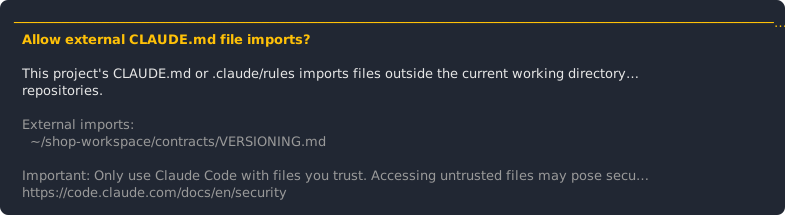
Activity 5 has you add an import inside the service and one outside it, and watch where the dialog appears.
6. /memory, auto memory, and the AGENTS.md fallback
What /memory lists
The documentation says that /memory lists CLAUDE.md and memory file locations, including files that do not exist yet. It also toggles auto memory and opens files. The documentation names /context as the way to check which memory files loaded.
In the recorded runs, /memory was also called a picker and a load list. Those are recorded observations, and the documentation's wording above replaces them. Use /memory to find and open memory files and /context to see what loaded. A location that /memory lists can be a file that does not exist yet, which is why it cannot tell you what loaded.
Auto memory
The documentation says that auto memory is on by default and that the first 200 lines or 25KB of MEMORY.md load. I make no claim about who writes auto memory, what it records, or where its files are stored. Check the current documentation before relying on any of those points.
The 200-line figure here is a load limit on MEMORY.md. It is a different figure from the CLAUDE.md aim in the section on /init, which is an aim for a file you write.
The AGENTS.md fallback
The documentation says that, from v2.1.277 or later, AGENTS.md is read when no CLAUDE.md or CLAUDE.local.md exists in or above the working directory. No recorded run exercised this fallback, so there is no recorded result to set beside it. Activity 7 practices the condition on four layouts.
Activity 6 has you open /memory in your own profile and compare it with /context.
7. Which instruction files load, and when
A CLAUDE.md above the service
Take the scoped session from earlier in the course: a session started in orders-service, with the system-map CLAUDE.md in shop-workspace one directory above it.
The documentation does not describe this case directly. What the documentation says is that the AGENTS.md fallback depends on whether a CLAUDE.md exists in the working directory or above it, and it names /context as the way to check which memory files loaded. In my view, that wording counts a CLAUDE.md above the working directory as part of the lookup, so the workspace CLAUDE.md is a candidate to load in a session started in orders-service.
The confirmation is yours. Start in orders-service, run /context, and write down whether the workspace CLAUDE.md is listed beside the service one. Report it as your own run. Activity 8 walks you through it.
A CLAUDE.md created mid-session
In the recorded run (Claude Code 2.1.295), a CLAUDE.md created in the middle of a session did not reach the running session. Activity 3 had you collect the same observation in your own run.
The documentation is silent on creating an instruction file mid-session, so it does not explain the result either way.
In my view, instruction files are gathered when a session starts. That cause is an inference: the recording did not show it, and the documentation does not state it. Test it against your own run from Activity 5: where did the import approval dialog show up? If it came at the start of the next session, that fits the inference.
The observation is about creating a CLAUDE.md. It says nothing about editing a file that already exists. It also does not carry over to rules: in the recorded run, the path-scoped rule attached when Claude read a matching file.
In my view, after you create an instruction file, start a new session and confirm with /context.
8. Instructions a team can maintain
The set you build in this chapter is a CLAUDE.md trimmed from the /init draft toward the under-200-lines aim, a rule file under .claude/rules/ with paths: migrations/**, and @ imports including one that reaches the contracts repository outside the working directory. The system-map CLAUDE.md in shop-workspace, above the service, completes the set. You check the set with /context in a fresh session.
lesson-04-end is the state recorded as the end of the lesson 04 recording, and Activity 9 compares your set against it. It is a reference, not an answer key, and the two sets can differ. The approval for the outside import lives in your Claude Code profile (in the recordings it was stored per project in the profile), so it is not part of your branch or of any tag.
Review checklist
In my view, treat a change to these files like a change to code, and check:
- The CLAUDE.md is under the 200-line aim (the aim the documentation gives), and the documentation also says to keep it short.
- Each line you added passes all three questions: the answer to each is yes, and a line that must hold every time says how you check it.
- Stale paths and version numbers are gone. Check each against the repository.
- Every @ import resolves to a file that exists.
- The rule's body still matches the directory it names.
- In a fresh session, /context, the documented check, shows what you meant to load.
In my view, committing the files and reviewing them in a pull request is also worth doing. None of this checklist is documented team practice.
Activity 9 assembles the files on a branch, runs these checks, and compares your set with lesson-04-end. When you finish it, orders-service has a branch with a CLAUDE.md under 200 lines, the migrations rule, and two imports, together with a /context listing from a fresh session that you have checked against your description of what should load.
Activity 1: Baseline: start a scoped session and read /context
Record which instruction files exist and which of them load, before you change anything. Every later activity adds to this baseline, so the instruction files you add in this chapter show up against it in /context for orders-service at lesson-04-start.
Steps:
-
From shop-workspace, check out the start state with
./checkout-lesson.sh 04. This activity needs Claude Code and the demo. Kafka and Docker are not used. -
Open a terminal in orders-service, not in shop-workspace, and start Claude Code there with
claude. Keep this session open until Activity 3 is finished. -
Run
/context all, the form the recorded session typed to see the memory files. Write down the memory files it lists, or that it lists none, and the overall size of the context. The documentation names /context as the way to check what loaded. If you also run plain/context, note any difference between the two. Later activities say run /context and mean the form you choose here. The documentation says the context window fills fast and performance degrades as it fills, so the overall size is the figure you compare later changes against. -
In a second terminal, change into shop-workspace, the directory that contains the orders-service directory, and list the instruction files on disk from there:
ls -a . orders-service find . -maxdepth 2 -name 'CLAUDE*.md' -o -name 'AGENTS.md' find . -maxdepth 4 -path '*/.claude/rules*' -
Write a baseline note with two separate lists: the files on disk, and the files /context listed. State any difference between them.
You should end with:
- a baseline note with the on-disk instruction files and the /context memory-file listing
- a Claude Code session started in orders-service and left open
Hints:
- Do not assume the tag has no instruction files. If orders-service already has a CLAUDE.md, put it in the note. Activity 3 says what to do about it.
- If /context lists no memory files, write that down: it is a valid baseline.
- The find commands also list matches in the other repositories inside shop-workspace. Your note needs the ones in shop-workspace and orders-service.
Check yourself:
- The baseline is recorded before any instruction file is created or edited. The /context listing in your note was taken before Activity 3 starts.
- You can say which instruction files exist on disk and which ones /context listed. The note has two separate lists and states any difference.
Activity 2: Sort candidate lines into keep, cut, and move
Practice the three questions on lines that are not in a file yet, before you apply them to a real draft. The criteria you settle on here are the ones you apply to the real /init draft of orders-service in Activity 3.
The twelve lines below are invented for this exercise. They are not taken from the recorded run, from the demo repository, or from Anthropic guidance, and some of them are wrong for the demo on purpose.
| No. | Invented candidate line for orders-service |
|---|---|
| 1 | Run the tests with pytest -q from the service root. |
| 2 | This is a FastAPI service. |
| 3 | The shared event contract is at version 1.3, as of the last release. |
| 4 | A forty-line description of every field of the OrderPlaced event, pasted in full. |
| 5 | Name new Kafka topics in lower case, with the event name last. |
| 6 | Never edit a migration that has already been applied. |
| 7 | Never change an event in a way that breaks existing consumers. |
| 8 | Write clean, well-structured code. |
| 9 | The tests live in the tests folder. |
| 10 | Do not edit anything under vendor/. |
| 11 | An order starts as PENDING and is confirmed after payment is captured. |
| 12 | Prefer small commits with one purpose each. |
Steps:
- For each line, apply the three questions from the section on what belongs in a CLAUDE.md. A line passes a question when its answer is yes. Sort the line as keep (it passes all three), cut (it fails the first or the second) or move. Move means a line worth having that is long or relevant to one part of the code only, a candidate for a path-scoped rule or an @ import.
- Write one sentence of reason per line. Name the question the line passed or failed, or one of the two documented facts: the documentation says to keep the file short and to aim for under 200 lines.
- Pick the one candidate that must hold every time. Write two sentences: why a line in a CLAUDE.md does not ensure it, and how you would notice a violation (in my view, for example by reading the diff or running the tests).
You should end with:
- a sorted table of the twelve lines, with a reason for each
- a two-sentence note on the line that must hold every time
Hints:
- Several sorts can be defended, so there is no fixed key. A different answer is fine if the reason names the question.
Check yourself:
- Every line has a reason tied to the test or to the two documented facts. No row has an empty reason, and no reason says only that the line seems fine.
- The note says a CLAUDE.md line is advice, because the file is delivered as context with no guarantee of compliance. It names no other control.
Activity 3: Run /init, cut the draft down, and note what /context shows
Create the trimmed service-level CLAUDE.md that Activities 4 and 5 extend with a rule and imports, and collect the mid-session observation that the section on load timing explains.
Steps:
-
In the session left open from Activity 1, confirm that orders-service has no CLAUDE.md. In a second terminal, from orders-service, run
ls CLAUDE.md; it should report that there is no such file. If the file exists, exit the session first, move the file out of the repository (for examplemv CLAUDE.md ~/orders-service-CLAUDE.md.original), start a new session in orders-service and use that session from here on. In both cases the file you create in step 3 is created mid-session. -
Create the scratch branch you use for the rest of the chapter:
git switch -c ch04-instructions. -
In the session, run
/init. When it finishes, read what it wrote. -
Without restarting, run /context. Record whether the new CLAUDE.md is listed among the memory files. Write the result as your own observation.
-
Commit the untouched draft and count its lines:
git add CLAUDE.md git commit -m 'Add the /init draft of CLAUDE.md' wc -l CLAUDE.md -
Go through the draft line by line with the three questions. A line passes a question when its answer is yes. Delete the lines that fail the first or the second question. If a line must hold every time and fails the third, add how you check it instead of deleting it. Aim to finish under 200 lines, the aim the documentation gives, and keep the file short. If the draft was already below 200 lines, still cut on value.
-
Save the file, count again, and commit:
wc -l CLAUDE.md git commit -am 'Trim CLAUDE.md' git diff --stat HEAD~1 HEAD -
Exit the session with
/exit. Start a new session in orders-service, run /context, and record whether the CLAUDE.md is now listed.
You should end with:
- the untouched draft (in the first commit) and the trimmed CLAUDE.md, each with its line count
- the
git diff --statoutput for the cuts - two /context notes, one before the restart and one after it, each labeled as your own run
Hints:
- /init output differs from run to run, so do not compare your draft with a recorded one.
- In the recorded run (Claude Code 2.1.295), a CLAUDE.md created mid-session did not reach the running session. If your result at step 4 differs, keep your result and label it as yours. The section on load timing sets the recorded observation beside it.
- Under 200 lines is an aim and a ceiling. A short draft needs trimming on value, not on length.
Check yourself:
- The trimmed file is shorter than the draft and under 200 lines, or you can explain why it is not. Compare the two
wc -lfigures. - Every line you kept passes all three questions, where a pass means the answer is yes. Pick three retained lines and, for each, say why the answers to the first two questions are yes and how the third is met: the line need not hold every time, or it says how you check it.
- Both /context observations are labeled as your own run. They state the result before and after the restart and do not describe it as documented behavior.
Activity 4: Write a path-scoped rule and watch when it attaches
Write a rule that applies to one directory, then watch when it attaches. You compare three descriptions: the documented one, the recorded one, and your own. This adds the path-scoped rule for migrations/** to orders-service.
Steps:
-
In orders-service, check which migration files the tag has:
ls migrations/versions. Write the rule so that each line is true of what you see there. -
Create
.claude/rules/migrations.mdwithpaths: migrations/**in its front matter and three to five lines of guidance about the migration files. The body shown in the section on path-scoped rules is illustrative, and its wording is my choice. Edit or delete any line that is not true of your directory. Commit the file on thech04-instructionsbranch. -
Start a new session in orders-service, so the file is not created mid-session. Run /context and record whether the rule is listed.
-
Ask Claude to show one source file outside migrations/, for example a model file. Look at the conversation for the rule, then run /context. Record both.
-
Type the prompt below. If that file is not in your
lslisting, use any file from it. Look at the conversation again, run /context again, and record both.Show me migrations/versions/0001_create_orders_tables.py -
Fill in a three-column note.
The documentation says In the recorded run (Claude Code 2.1.295) What you saw in your run Path rules load when Claude uses Read, Write or Edit on a matching file. The rule attached to the conversation when Claude read a matching file. It did not appear in the memory files that /context listed. Your own result for steps 3 to 5, in both places.
You should end with:
.claude/rules/migrations.mdwithpaths: migrations/**in its front matter- the three-column note, with documented, recorded, and observed behavior in separate columns
Hints:
- Do the read outside migrations/ first. A rule that has already attached cannot tell you about a later read of a non-matching file.
- Look in two places: the conversation, and the memory files in /context. The recorded rule showed up in the first and not in the second.
- Do not ask Claude whether it can see the rule and count the answer as evidence. Read the conversation and /context instead.
Check yourself:
- The rule uses the recorded paths form, and its body is true of the repository. Open the file and check the front matter and the directory it names.
- Each column of the note carries its label, and the observed column is your own run.
Activity 5: Add @ imports and meet the approval dialog
Add an @ import and watch what it does and does not change. Then add an import that resolves outside the working directory and meet the one-time approval dialog. This activity covers the interactive dialog, and it leaves the orders-service CLAUDE.md with an internal and an external @ import and a record of the approval for the external one.
Steps:
-
Work on the
ch04-instructionsbranch. Start a session in orders-service, run /context, and write down the overall size of the context. This is your before figure. -
Pick one short, stable reference file inside orders-service that exists at the tag. Check with
ls, and do not pick a file that holds credentials. In your editor, add one line to the CLAUDE.md: an @ followed by the path of that file, relative to the CLAUDE.md (for example@README.md, if your checkout has that file). -
Exit the session and start a new one in orders-service. Run /context. Record how the imported file appears, if it does, and compare the overall size with your before figure. The documentation says imports do not reduce context. Your note shows what happened in your run.
-
Check that the contracts file exists, and read it:
ls ../contracts/VERSIONING.md. Then, in your editor, add this line to the CLAUDE.md:@../contracts/VERSIONING.md -
Exit the session and start a new one in orders-service. Note when the approval dialog appears. In the recordings the dialog came at the start of the next session after the import was added, not in the session where the line was typed. Approve it, since the file is one you have just read in your own checkout. Write down in your own words what the dialog asked.
-
Exit and start one more session. Record whether the dialog appears again. In the recordings the approval was stored per project in the profile.
-
Run /context and record how the two imports are listed, if at all.
-
Commit the change:
git commit -am 'Add imports to CLAUDE.md'.
You should end with:
- a CLAUDE.md with one internal and one external @ import
- a note on the dialog: when it appeared, what it asked in your words, and whether it appeared again
Hints:
- Expect the dialog at the start of the next session after the import is added, as in the recordings. Do not expect it in the session where you typed the line.
- Choose a stable reference file as the internal import, and never one that holds credentials.
Check yourself:
- You can state that imports do not reduce context and support it with your /context note. The note compares the context before and after the internal import.
- You can state the dialog as a one-time approval for imports outside the working directory, seen in an interactive session. The note records when the dialog appeared and whether a second one appeared.
Activity 6: Read /memory, find the auto memory toggle, and relate it to /context
Read /memory in your own profile and keep it apart from /context. /memory lists locations and toggles auto memory. /context checks what loaded. This leaves you able to check the loaded instruction set of orders-service with /context and to find the memory settings with /memory.
Steps:
- In a session in orders-service, run
/memory. Note what it lists. Look for the CLAUDE.md and memory file locations, and for any listed file that does not exist yet. - Find the auto memory toggle in the same view and note its state. Leave it as you found it.
- Use /memory to open your trimmed CLAUDE.md, which confirms that it opens files. Close it without editing.
- Run /context and compare it with what /memory listed. Write one sentence on the difference in purpose, in the wording the documentation uses: /memory lists CLAUDE.md and memory file locations, including files not yet created, toggles auto memory, and opens files; /context is the way the documentation gives to check which memory files loaded.
- If a memory file for auto memory exists, open it and record what it holds without interpreting it. If none exists, record that. What it holds depends on your profile, so there is no expected entry.
- Add the auto memory default and the MEMORY.md limit to the note, with the date on which you checked them: the documentation says auto memory is on by default, and that the first 200 lines or 25KB of MEMORY.md load.
You should end with:
- a comparison note on /memory against /context
- a record of the auto memory toggle state and of any memory file you found
Hints:
- Some listed locations will be files that do not exist yet. The documentation says /memory lists them, and that is why /memory cannot serve as a list of what loaded.
- Leave the toggle as it was. Later chapters do not assume a changed setting.
Check yourself:
- The note uses the documented wording: /memory lists locations and toggles auto memory, and /context checks what loaded.
- You can state the auto memory default and the MEMORY.md limit with the date on which you checked them: on by default, and the first 200 lines or 25KB of MEMORY.md.
Activity 7: Predict the AGENTS.md fallback
Practice the documented condition for the AGENTS.md fallback on four layouts. The layouts are invented for this exercise. This lets you reason about the instruction files of the demo repositories without changing the demo.
The documentation says that, from v2.1.277 or later, AGENTS.md is read when no CLAUDE.md or CLAUDE.local.md exists in or above the working directory. No recorded run exercised the fallback.
Prediction table (the documented condition, v2.1.277 or later, plus the date on which you checked it):
| Layout (invented) | Condition holds? | AGENTS.md read? | Reasoning |
|---|---|---|---|
| A. A service directory with its own CLAUDE.md and an AGENTS.md beside it | |||
| B. A service directory with only an AGENTS.md: no CLAUDE.md or CLAUDE.local.md in it or above it | |||
| C. A service directory with an AGENTS.md, and a CLAUDE.md in the workspace directory above it | |||
| D. A directory with no CLAUDE.md, CLAUDE.local.md or AGENTS.md in or above it |
Steps:
-
For each layout in the table, predict whether the condition holds and whether an AGENTS.md is read. Use only the documented condition.
-
Write one line of reasoning per layout. For layout C, write out the condition's wording and what it implies for that layout. Add no rule of your own.
-
Optional: try layout B in a scratch directory. First confirm that no CLAUDE.md or CLAUDE.local.md exists in or above it:
mkdir -p ~/scratch-agents && cd ~/scratch-agents
d="$PWD"; while [ "$d" != / ]; do find "$d" -maxdepth 1 -name 'CLAUDE*.md'; d=$(dirname "$d"); done
find / -maxdepth 1 -name 'CLAUDE*.md'
If any of these prints a file, a CLAUDE.md sits above your scratch directory (a home directory can hold one), and the directory is not layout B. Otherwise create an AGENTS.md with one distinctive sentence, start Claude Code in the directory, and run /context. Record the result as your own run. It is not a recorded result, because no recorded run tried the fallback.
You should end with:
- a four-row prediction table with a reason for each row
- optionally, a note of the scratch-directory result labeled as your run
Hints:
- Use only the documented condition. Paraphrase it in your reasoning and add nothing to it.
- The fallback is documented from v2.1.277. No recorded run tried it, so label the optional check as your own run.
Check yourself:
- Each prediction follows from the documented condition. The reasoning paraphrases the condition and adds no further rule.
- The table caption states v2.1.277 or later and the date on which you checked the condition.
- Your reading matches this one:
- A: a CLAUDE.md exists in the working directory, so the condition does not hold and the documented statement gives no reason to expect AGENTS.md to be read.
- B: the condition holds, so AGENTS.md is read.
- C: the condition asks for no CLAUDE.md in or above the working directory, and one exists above it, so the condition does not hold.
- D: the condition holds, but there is no AGENTS.md, so there is nothing to read.
Activity 8: Check ancestor loading and explain the mid-session result
Check that a CLAUDE.md above the service loads when the session starts in the service, then explain the Activity 3 observation with each claim labeled. The result is your own /context evidence for the workspace CLAUDE.md above orders-service, and an explanation of the load timing you observed in Activity 3.
Steps:
-
Check whether shop-workspace has a CLAUDE.md: from orders-service, run
ls ../CLAUDE.md. If the tag has none, create a short system map in your editor before you start the session, on a scratch branch in shop-workspace namedscratch/system-map. From shop-workspace, create the branch withgit switch -c scratch/system-map, then save the file there asCLAUDE.md. Do not commit it. This one is illustrative, so label it that way in the file:# shop-workspace system map (illustrative) Five repositories: shop-workspace, contracts, orders-service, inventory-service, payments-service. orders-service, inventory-service and payments-service are FastAPI services with SQLAlchemy, Alembic, SQLite, pytest, ruff and mypy. contracts holds the event schemas, the event envelope and the Kafka helpers. -
Start a new session in orders-service. Run /context and record whether the workspace CLAUDE.md is listed beside the service one. Put the listing in your note and report it as your own run. Draw no conclusion from the order of the listing.
-
Run /memory and note whether both locations appear, in the documented wording.
-
Return to your two notes from Activity 3, before and after the restart. Write a four-line explanation, each line starting with its phrase:
- In the recorded run: what your Activity 3 notes show, and what the recorded run showed
- The documentation says: what the documentation says about creating an instruction file mid-session
- In my view, as an inference: the cause you propose
- In my view, as a recommendation: what to do after you create an instruction file
-
Finish with one sentence on what to do after creating an instruction file, and how to confirm it.
-
If you created the illustrative system map in step 1, keep it in place until the /context check in Activity 9 step 3 is done. Delete it before Activity 9 runs
./checkout-lesson.sh 04 --end, so that no uncommitted file is left in shop-workspace. From shop-workspace, rungit status --shortand confirm that it lists?? CLAUDE.md, which means the file is the untracked one you created. Runrm CLAUDE.md, then rungit status --shortagain and confirm that CLAUDE.md is no longer listed. To discard the scratch branch as well, rungit switch --detach lesson-04-startand thengit branch -D scratch/system-mapfrom shop-workspace.
You should end with:
- a /context note on the workspace and service CLAUDE.md files
- a four-line labeled explanation of the mid-session result
Hints:
- Keep the observation to creating a file. Do not widen it to edits of an existing file.
- Your /context listing is your only evidence for ancestor loading. Make no claim about order or precedence.
Check yourself:
- The ancestor-loading statement is your observation, backed by the /context listing in your note, and it makes no claim about order or precedence.
- The explanation labels the cause as an inference and does not say the documentation describes it. The documentation line says the documentation is silent on the point.
- Your four lines match these:
- In the recorded run, a CLAUDE.md created mid-session did not reach the running session.
- The documentation says nothing about creating an instruction file mid-session.
- In my view, as an inference, instruction files are gathered when a session starts.
- In my view, as a recommendation, after creating an instruction file, start a new session and confirm with /context.
Activity 9: Assemble the project instructions and review them like code
Pull the chapter's files into one reviewed change, verify what loads in a fresh session, and compare your set with lesson-04-end, the recorded reference state. This completes the project instructions of orders-service for the chapter: a trimmed CLAUDE.md, a path-scoped rule, and imports, verified with /context and compared with lesson-04-end.
Steps:
-
Work on the
ch04-instructionsbranch in orders-service. Gather the trimmed CLAUDE.md, the migrations rule, and the two imports. Confirm withlsthat each import resolves to an existing file. -
Run
wc -l CLAUDE.mdand confirm the file is under the 200-line aim (the aim the documentation gives). The documentation also says to keep the file short. Remove any line that fails the first or the second of the three questions, add how you check it to any line that must hold every time and fails the third, and check every version number and path in the file against the repository. -
Start a new session in orders-service and run /context. List the instruction files that loaded: the service CLAUDE.md, the workspace CLAUDE.md above it, and the imports. Then type the prompt below (or a file from your
lslisting, if that one is missing) and note whether the rule attaches.Show me migrations/versions/0001_create_orders_tables.py -
Write a pull-request-style description. Cover what each file is for, which lines you cut and why, and the checks you ran. In my view, this is a useful format; it is not documented practice.
-
Commit all work on the branch with git, so every file you intend appears in the commit. The recorded session used the prompt
Commit the CLAUDE.md and the rule.for its commit. -
Commit any work that is not yet committed, because the checkout script changes the checked-out state of every repository. If Activity 8 had you create an illustrative system map in shop-workspace, delete it now, as step 6 of that activity says. Then, from shop-workspace, check out the end state with
./checkout-lesson.sh 04 --end. -
Compare the end state with your files by reading them: the CLAUDE.md, the
.claude/rules/directory, and the imports. Note which lines the end state keeps that you cut and which lines you kept that it lacks, with a sentence on each.
You should end with:
- a branch in orders-service with the CLAUDE.md, the rule, and the imports
- a /context listing from a fresh session
- a pull-request-style description
- a comparison note against lesson-04-end
Hints:
- There is no pass or fail match with lesson-04-end, because two sets of instructions can both be sound.
- The comparison covers files only. In the recordings the approval for the outside import was stored per project in the profile, so it is not in the end state.
- To go back to your work, run
git switch ch04-instructionsin orders-service.
Check yourself:
- The CLAUDE.md is under the 200-line aim and every import resolves. Attach the
wc -loutput and confirm that each @ path exists. - The fresh-session /context listing shows what your description says should load, or you explain the difference. Attach the listing.
- The comparison with lesson-04-end is qualitative. It names differences and gives reasons, not a score.
Starting state
The five demo repositories at lesson-04-start, reached with ./checkout-lesson.sh 04. orders-service is the FastAPI service with SQLAlchemy, Alembic, SQLite, pytest, ruff, and mypy. The tag's instruction files are something you confirm on disk instead of assuming: whether orders-service already has a CLAUDE.md, whether shop-workspace already holds its system-map CLAUDE.md, and whether a migrations/ directory exists. Activity 1 records what is on disk and what /context lists, and Activities 3, 4, and 8 each say what to do when the tag differs from what they expect.
What you add to orders-service
- A baseline note of the instruction files on disk and the /context memory-file listing (Activity 1).
- A CLAUDE.md that you trimmed from the /init draft, committed on the
ch04-instructionsbranch with the untouched draft in the first commit and both line counts noted (Activity 3). - A rule file
.claude/rules/migrations.mdwithpaths: migrations/**in its front matter, and a note comparing the documented, recorded, and observed attachment (Activity 4). - Two @ imports in the CLAUDE.md, one inside the service and
@../contracts/VERSIONING.mdoutside it, with a note on the one-time approval dialog (Activity 5). - A comparison of /memory with /context, and the auto memory default and MEMORY.md limit with the date on which you checked them (Activity 6).
- The system-map CLAUDE.md in shop-workspace above the service, checked with /context in a session started in orders-service (Activity 8 creates an illustrative one on the
scratch/system-mapbranch only if the tag has none, and you delete it before Activity 9 runs the checkout script), and a labeled explanation of why a CLAUDE.md created mid-session did not reach the running session. - One reviewed branch with a pull-request-style description and a comparison note against
lesson-04-end(Activity 9).
Activity 2 and Activity 7 are exercises on invented material and add no files to the demo.
Ending state
Your ch04-instructions branch in orders-service holds instructions that you built and checked: a CLAUDE.md trimmed from the /init draft toward the under-200-lines aim, a rule file under .claude/rules/ with paths: migrations/**, and @ imports including one outside the working directory. The approval for that import lives in your Claude Code profile, not in the branch or in any tag. You have confirmed with /context in a fresh session that the service CLAUDE.md and the CLAUDE.md above it load.
lesson-04-end is the recorded reference state for the chapter. Read its files in Activity 9 and compare them with your own. The two sets can differ and both can be sound.
Continuity
Each activity builds on the branch from the one before. Activity 3 creates the CLAUDE.md, Activities 4 and 5 add the rule and the imports, Activity 8 checks the workspace CLAUDE.md above the service, and Activity 9 assembles and reviews the set. Commit before you run ./checkout-lesson.sh 04 --end from shop-workspace, because the script changes the checked-out state of every repository.