Lesson 6 of 14 · 28 min read
Skills: reusable instructions for you and your team
Turn the handoff prompt into a skill, write a description that lets a skill start on its own, compare it with a published skill from a plugin, and make a new project skill visible in a running session.
Code: shop-workspace and the four repositories its setup.sh clones, from the tag lesson-06-start to lesson-06-end. To get the demo, see lesson 1.
This chapter starts at the tag lesson-06-start. Run ./checkout-lesson.sh 06 from shop-workspace to put the demo there, then start Claude Code in orders-service. It ends at lesson-06-end. If your demo goes wrong, run ./checkout-lesson.sh 06 --end from shop-workspace to jump every repository to lesson-06-end.
You need a Claude account with Claude Code access, a Claude Code session in orders-service, and network access to GitHub for the plugin install later in the chapter. Kafka, a running shop and a GitHub copy of the repositories are not needed.
This chapter was recorded on Claude Code 2.1.295 in October 2026. Documented defaults, limits and labels are as of that month and may have changed since. The recording used Opus 5.5 (claude-opus-5-5), effort medium and permission mode auto.
Each claim about how Claude Code behaves says where it comes from: 'the documentation says' marks documented behavior, 'in the recorded run' marks what happened in the lesson 06 recording on Claude Code 2.1.295, and 'in my view' marks my own inference or recommendation. Model output differs between runs, so a recorded result describes one run and promises nothing.
1. What a skill is and how to see the ones you have
A skill is a named capability with a description. The documentation says the description is listed so that the model can see it, a skill can be typed as a slash command, and a skill can be set to run only when you type it, which removes its description from the context. In the recorded run, the model used a skill by calling the Skill tool. The description is text in the context window, so it takes up room like any other loaded text.
The documentation says Claude Code watches skill directories and picks up changes to them in the session. One case needs an extra command, which the refresh section covers.
/skills lists the skills your session can use. Run it before you create anything and keep the result as a baseline. In my view, in a profile with no skills or plugins of its own, the entries you did not create are the bundled skills. They were there before you started. The list changes with the Claude Code version and the date, so read it as an observation about your session and not as a fixed catalog. Activity 1 has you record it.
2. Custom commands are skills
A custom command is a saved prompt that you run by typing its name. In this chapter such a command is a skill, so what the chapter says about invocation, descriptions and refreshing applies to it.
The documentation says a skill runs when you type it, and a skill that comes from a plugin is typed in the form /plugin:skill, with the plugin name in front. A skill of your own is typed as /name. In the recorded run, the handoff prompt was saved as a skill, and /handoff was typed late in the session.
In my view, a prompt you would have saved as a custom command can be a skill instead, with the same slash form. I make no claim about how files kept in a separate commands directory behave. Check the current documentation before relying on them.
The next section creates a skill that runs only when you type it.
3. A user skill that runs only when you type it
A handoff written by prompt asks for four things: where the work stands, what was decided, the next step, and links to files and commits instead of their content. This section turns that prompt into a skill. The lesson 06 recording used a variant of the handoff prompt that saves to the OS temp directory, and this chapter keeps that wording. If you kept an earlier version of the handoff prompt that names a file, use this wording instead, so that your skill matches the recording:
Write a handoff for a fresh session: where we are, what we decided, the next step, and links to the files and commits instead of their content. Save it to the OS temp directory and tell me the path.The prompt that created the skill in the recording added one instruction, to always save to the same file instead of asking for a name. The skill body is therefore the handoff prompt plus that instruction.
The documentation says setting disable-model-invocation: true in a skill removes the skill's description from the context, so the skill runs only when you type it, and /skills marks it as user-only. Without the setting, the description is listed and the model can call the skill by itself.
In my view, set it for this skill. A handoff is something you write at a session boundary, at a point you choose. The model should not start one part-way through a task.
The skill belongs in your own configuration, outside the demo repositories, so nobody else gets it. The recording used a separate Claude Code profile, ~/.claude-course/, which you do not have, so the recorded prompt asked for the file at ~/.claude-course/skills/handoff/SKILL.md. In your own profile the same file is ~/.claude/skills/handoff/SKILL.md: a directory named after the skill, with a file called SKILL.md inside. In my view, your own skills live under ~/.claude/skills/, a location this chapter does not document. The frontmatter holds the disable-model-invocation: true setting and a description. The body is the handoff prompt above plus the instruction to always save to the same file. Activity 2 gives the exact prompt that creates the skill.
In the recorded run, /handoff was typed late in the session. A handoff differs from run to run, so judge the one you produce by structure. Does it have state, decisions, a next step and links instead of content? The wording is not the test.
4. Installing a published handoff skill from a pinned plugin
The documentation says an installed plugin can run code with your privileges, and its hooks and servers run outside the sandbox.
The sandbox is the operating-system boundary around the shell commands Claude Code runs. Hooks and servers that a plugin brings sit outside that boundary.
In my view, pinning a plugin to a tag does not reduce that trust, because the pinned version still runs with your privileges. Also in my view, read the plugin's repository at the tag before you install it.
The published handoff skill comes from mattpocock/skills, tag v1.2.3 (commit 6acc160). At the tag, the repository's marketplace file names the marketplace mattpocock and the plugin mattpocock-skills, and a handoff skill is present. The documentation says a marketplace source accepts a #ref suffix that pins it to that ref. In the recorded run, the marketplace was added with #v1.2.3 and the plugin was then installed:
/plugin marketplace add mattpocock/skills#v1.2.3
/plugin install mattpocock-skills@mattpocock
In the menu that followed, the recorded run chose 'Install for you (user scope)'.
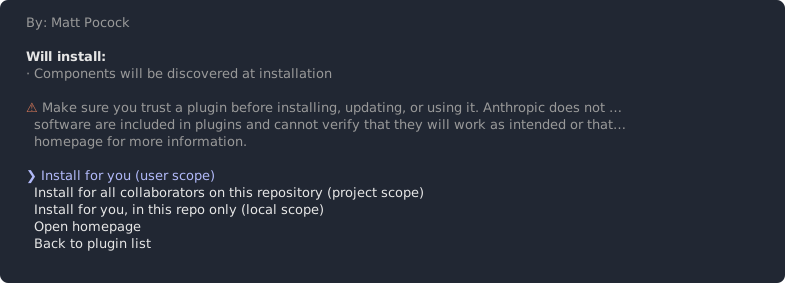
The project's README documents a different install route and does not document tag pinning. The pinned route resolved to the names above. In my view, use the pinned route, so that you install the version the recorded runs used. Also in my view, an unpinned route could resolve to a later version, which would differ from the recorded runs.
Activity 3 walks you through the install.
5. Comparing your handoff skill with the published one
The documentation says a plugin skill is typed as /plugin:skill. The plugin is named mattpocock-skills, so its handoff skill is typed /mattpocock-skills:handoff, while your own skill stays /handoff. The namespace keeps the two apart. Take the exact string from your /skills listing.
Compare the two skills on four axes:
- How each one is typed.
- Whether
/skillsmarks each one as user-only. Whether the published skill carries the setting is something you check in your listing. If a skill is not user-only, its description is listed in the context and costs context there. - Whether the handoff each one produces has state, decisions, a next step and links instead of content.
- Who maintains the text: you, for your own file, or a third party, at a pinned tag.
What the published skill contains is for you to read in your runs and, if you choose, in the repository at the tag.
In the recorded run, after the plugin was installed, the session was asked to compare the two skills with this prompt:
Compare my handoff skill with the handoff skill from mattpocock-skills: where each one writes and what each one keeps.The prompt covers two things you can also see for yourself, in the files and in your own runs: where each handoff is written and what each one keeps. In my view, treat Claude's answer as a model's reading of the two files and check it against the files.
One or two runs cannot show that either skill is better. Any conclusion is your inference. In my view, keep your own skill when you want control of the wording and of where the handoff is saved. Try a published skill when you want text that someone else maintains and you have read it at the pinned tag.
Activity 4 has you run both skills on the same work and fill in the comparison.
6. A project skill shared through the repository
A project skill is a skill whose file is committed in the repository. In my view, committing the file is what shares it, because anyone who checks the repository out gets the file and with it the skill. This is how any committed file travels, and Activity 8 checks it from a second clone. Your user skill and the plugin sit in your own profile, not in the repository, so they are not shared this way.
In the recorded run, the project skill was written under .claude/skills in orders-service with this prompt:
Write a project skill new-consumer in .claude/skills: the steps to add an idempotent Kafka consumer in this service, the way the PaymentCaptured one was done. Make the description say when to use it.It was committed with:
Commit the project skill.The session was already running when the skill was created, which matters for the next section. Activity 5 walks you through creating it.
There are three places to put a piece of guidance, and in my view the choice runs like this:
- A
CLAUDE.mdfile is an always-loaded instruction file that a team keeps. Use it for guidance that applies to every task in the repository. - A project skill is a procedure or guidance that the team shares and that is used on demand. The steps for adding a consumer are an example.
- A user skill is personal. Use it for something you want in every repository that others do not need, as with the handoff skill.
In my view, a project skill is committed text, so review changes to it in a pull request like any other file.
7. Making a skill created mid-session visible
The recorded session created the project skill while it was running. Whether a running session sees such a skill depends on one rule.
The documentation says, on its skills page (paraphrased), that Claude Code watches skill directories and picks up changes in the session. The exception is a top-level skills directory that did not exist when the session started. Run /reload-skills to make it visible. The documentation does not mention /clear for this case. This rests on the documentation alone, because the recorded run did not try /reload-skills.
In the recorded run, the new project skill reached the model's skill list only after /clear, and /reload-skills was not tried. This is a difference between a run and the documentation's wording, not a contradiction in the documentation. I make no claim about how /clear and /reload-skills compare; your own trial is the result. The recorded result stays an observation, and the optional second trial in Activity 6 lets you record yours.
A rule you can use: if a skill in a top-level skills directory that is new this session is missing from /skills, run /reload-skills. Edits to a skills directory that existed when the session started need no reload.
Activity 6 applies the rule to the skill from Activity 5.
8. Why the description decides when a skill triggers
When the model picks a skill by itself, it works from the description in the listing. The documentation says description and when_to_use are listed together, and the combined text is cut at 1,536 characters in the listing. Text past the cap is not listed.
In the recorded run, the project skill's description led to a Skill tool call for a question that did not name the skill:
How would I add a consumer for StockReserved here?That is one run, not a guarantee. A Skill tool call in the transcript is the evidence that a skill triggered. The wording of the answer is not.
A skill with disable-model-invocation: true has no description in the context, so it cannot trigger on its description and runs only when you type it. Your handoff skill is that case.
Three pieces of advice on writing a description, all in my view:
- Describe the situation in the words a teammate would use in a request, such as 'add a consumer', and not in the skill's name.
- Put the words that matter first, because text past the cap is cut.
- Stay well below 1,536 characters. The count covers
descriptionandwhen_to_usetogether, and how the two are joined is not stated.
An example of my own, not recorded output, for the new-consumer skill: 'Use when someone asks how to add a consumer for a Kafka event in this service, or how to make an event handler idempotent. Follows the way the PaymentCaptured consumer was built.'
Whether a question triggers the skill is model behavior, so repeat a question before you rely on the result. A question that does not match is the other half of the test. Activity 7 has you log both kinds, each marked as triggered or not triggered.
Activity 1: List the skills in a fresh session
Record the skills your session lists before you create any, with the Claude Code version and the date beside the list.
Steps:
- In
shop-workspace, run./checkout-lesson.sh 06to put the demo atlesson-06-start. Start a session inorders-servicewithclaude. - Run
/skills. Copy the list into a notes file, then press Esc to close it. - Note the Claude Code version your session reports and today's date beside the list.
- Mark each entry as one you did not create. In my view, the entries you did not create are the bundled skills, so label the group 'bundled skills', note the date on which you checked beside the label, and note that the label is your inference. In a profile with no skills or plugins of its own, these are the skills present before you add any.
- Keep the notes file. Activities 2, 3 and 5 each end with another
/skillsrun. Add the new entries under the baseline so you can see what you added.
You should end with:
- A notes entry with the
/skillslist, the Claude Code version and the date. - A line in the notes ready to receive the entries that later activities add.
Hints:
- A different list on a different version or date is expected. The list is an observation, so keep the date on which you checked it beside it.
- The recorded session started in a clean profile. If your profile already has skills or plugins, your list will be longer.
Check yourself:
- The baseline list is captured with version and date. The notes contain the
/skillsoutput, a version string and a date. - You treat the list as an observation and not a documented catalog. The notes label the list as observed in your session.
- The entries you did not create are named as the bundled skills, with the label noted as an inference. The notes carry the date on which you checked beside them.
Activity 2: Turn the handoff prompt into a user skill that runs only when typed
Create your own handoff skill from the handoff prompt, set it to run only when typed, and check both facts.
Steps:
-
Start a session in
orders-service, or continue the one from Activity 1. -
Type this prompt exactly as written. Only the path differs from the recorded prompt, and the quoted part must stay unchanged so that Activity 4 compares skills and not prompts:
Turn this handoff prompt into a user skill at ~/.claude/skills/handoff/SKILL.md with disable-model-invocation: true, and make it always save to the same file instead of asking for a name: "Write a handoff for a fresh session: where we are, what we decided, the next step, and links to the files and commits instead of their content. Save it to the OS temp directory and tell me the path." -
Open the file Claude wrote. Check that the frontmatter has
disable-model-invocation: trueand a description, and that the body is the handoff prompt plus the instruction to always save to the same file. If the description does not say when you would want a handoff, edit the description only. -
Run
/skillsand press Esc. Confirm the skill is listed and marked as user-only. The documentation says a top-level skills directory that did not exist when the session started needs/reload-skills, and edits to a directory that existed at the start need no reload. If the skill is not listed, run/reload-skills. In my view, a user-level skills directory created after the session started behaves like the project one, because the documentation speaks of a top-level skills directory. If it is still missing, the path in the prompt may not be a skills location in your setup. Record that in your notes. -
In a short session with a few exchanges about
orders-service, type/handoff. Open the file at the path it reports. Tick state, decisions, next step and links instead of content against the document. -
In the same session or a new one, ask for a handoff in plain words without typing the skill name. Note whether the Skill tool was called for your skill.
-
Run
/skillsagain and add the new entry to your notes.
You should end with:
- A user-level skill file whose frontmatter has
disable-model-invocation: trueand whose body is the handoff prompt plus the instruction to always save to the same file. - The
/skillsline showing the skill as user-only. - One handoff produced by typing the skill, with a tick-list against the four parts.
- A note on whether the plain-words request invoked the skill.
Hints:
- The frontmatter value is spelled
disable-model-invocation: true. - Check the handoff for its four parts, not its wording. Wording differs between runs.
- Keep the quoted handoff prompt identical to the recorded one.
Check yourself:
- The skill file matches the recorded variant. The body is the handoff prompt plus the instruction to always save to the same file.
- The skill is marked user-only in
/skills. - Typing the skill's name produces a handoff with state, decisions, a next step and links. You tick each part against the document. The check is on structure, because model output varies.
- The plain-words request did not invoke the skill. The transcript shows no Skill tool call for it. If there is one, record it as an observation and re-check the frontmatter.
Activity 3: Install the pinned plugin and find its handoff skill
Install the published handoff skill from mattpocock/skills, pinned at v1.2.3, and find it under its plugin namespace.
Steps:
-
Before you install, write the trust statement in your notes in your own words: an installed plugin can run code with your privileges, and its hooks and servers run outside the sandbox.
-
Optional, and in my view worth doing: read the plugin repository at tag
v1.2.3. -
Add the marketplace, pinned to the tag. The marketplace name is
mattpocock:/plugin marketplace add mattpocock/skills#v1.2.3 -
Install the plugin
mattpocock-skillsfrom that marketplace:/plugin install mattpocock-skills@mattpocockIn the menu that follows, choose 'Install for you (user scope)', as the recorded run did.
-
Run
/skillsand press Esc. Find the handoff skill. Note its namespaced form, which follows/plugin:skill, and whether/skillsmarks it as user-only. -
Record the marketplace name, the plugin name and the tag in your notes. Add the new entries to the list from Activity 1.
You should end with:
- A trust sentence in your own words.
- The plugin
mattpocock-skillsinstalled from the marketplace pinned atv1.2.3. - A
/skillsline showing the namespaced handoff skill. - Notes with the marketplace name, plugin name and tag.
Hints:
- The project's README documents a different route and does not document tag pinning. Use the pinned route so that you get the version the recorded runs used.
- If an install step fails, copy the message into your notes. Do not improvise a different route.
- At the tag, the marketplace file names the marketplace
mattpocockand the pluginmattpocock-skills.
Check yourself:
- Your notes name the marketplace, plugin and tag as
mattpocock,mattpocock-skillsandv1.2.3, and/skillslists the handoff skill under the plugin namespace. - You stated the trust consequence before relying on the plugin. The notes contain one sentence covering privileges and hooks and servers outside the sandbox.
Activity 4: Compare the two handoff skills on the same work
Run your skill and the plugin's skill after the same work, compare them on four axes, and write a conclusion that you mark as your own inference.
Steps:
-
Pick two or three short prompts about
orders-serviceand keep their text. For example: 'What does the PaymentCaptured consumer do?' and 'Where is it tested?' -
Start two fresh sessions in
orders-service. Send the same prompts, in the same order, in each, so that both skills see the same work. -
At the end of the first session, type your skill:
/handoff. At the end of the second, type the plugin's skill in its namespaced form. By the documented pattern that is/mattpocock-skills:handoff. Use the exact string from your/skillslisting. -
In a session where both skills are available, send the prompt the recorded run used:
Compare my handoff skill with the handoff skill from mattpocock-skills: where each one writes and what each one keeps. -
Fill in a comparison with one column per skill and these rows: how it is typed; whether
/skillsmarks it as user-only; whether the handoff has state, decisions, a next step and links instead of content; who maintains the text. -
Write a two or three sentence conclusion and mark it 'in my view', since it is your inference.
-
Note where your two runs differ from each other, and where Claude's answer to the compare prompt differs from what you see in the two skill files.
You should end with:
- A filled comparison with the four rows for both skills.
- A short conclusion marked 'in my view' as your inference.
- A note of the differences from step 7.
Hints:
- Compare structure against the four-part checklist, not wording. One run each is not a measurement.
- Report what you see in your runs and in the files. Whether the plugin's skill is user-only is for your
/skillslisting to show. - Expect differences between your runs. Model output differs from run to run.
Check yourself:
- The comparison records the typed form and the user-only status for both skills. Both columns hold a
/skillsobservation and not an assumed value. - The conclusion is marked 'in my view' as inference and does not generalize from one run. The label is present and no sentence claims a documented difference.
Activity 5: Create the project skill in the repository
Create the project skill in a running session where its skills directory did not exist at the start, and record what the session does before any refresh.
Steps:
-
Start a new session in
orders-serviceatlesson-06-startwithclaude. List the repository's.claudedirectory, for example withls -a .claude, and confirm there is no top-levelskillsdirectory. Keep the listing in your notes. -
In the running session, type this prompt exactly as written:
Write a project skill new-consumer in .claude/skills: the steps to add an idempotent Kafka consumer in this service, the way the PaymentCaptured one was done. Make the description say when to use it. -
Open the file Claude wrote under
.claude/skills. Copy the description it wrote into your notes. Then replace it with a first draft of one sentence that says only what the skill does and not when to use it. Activity 7 improves this description. -
Run
/skillsand press Esc. Note whether the new skill is listed. -
Ask a question that the skill should answer, without naming the skill. The recorded run asked the question below. Use it or your own words:
How would I add a consumer for StockReserved here?Note whether the Skill tool was called.
-
Stop here. Do not refresh. Leave the session open and the file uncommitted for Activity 6.
You should end with:
- A project skill file under the repository's top-level skills directory, uncommitted.
- Notes showing the directory was absent at session start, and what
/skillsand the question did before any refresh.
Hints:
- Creating the directory after the session starts is the point. If you create it first, you skip the case the refresh section describes.
- Write down what happened even if the skill is listed. A run is an observation and not a guarantee.
Check yourself:
- The skills directory did not exist at session start. The listing from step 1 shows no top-level skills directory.
- The pre-refresh observation is recorded. The notes contain the
/skillsresult and the question result from before any/reload-skills.
Activity 6: Make the new project skill visible with /reload-skills
Apply the documented refresh route to the skill from Activity 5. As an option, run the recorded /clear route in a separate trial and label the result as your observation.
Steps:
- In the session from Activity 5, run
/reload-skills. - Run
/skillsand press Esc. Note whether the project skill is now listed. - Ask the unnamed question from Activity 5 again. Note whether the Skill tool was called. Either outcome is a result to record, and Activity 7 works on the description.
- Optional second trial, an observation and not a documented route: remove the
.claude/skillsdirectory, end the session and start a new one. After the session has started, recreate the skill with the Activity 5 prompt. Then run/clearinstead of/reload-skills. Check/skillsand the question as before. - Record both outcomes under separate labels: documented route, and your own observation.
- Leave the skill file in place for Activity 7.
You should end with:
- Notes on the
/reload-skillsresult. - Optionally, notes on the
/cleartrial, labeled as your own observation.
Hints:
- Do not run both routes in one session. The second would be confounded by the first.
- In the recorded run, the skill was seen only after
/clear, and/reload-skillswas not tried. The documentation names/reload-skillsand does not mention/clearfor this case. I make no claim about how/clearand/reload-skillscompare; your own trial is the result. - A trial that behaves differently from the recorded run is a finding about your run. It does not correct the text.
Check yourself:
- The skill is listed after
/reload-skills. The/skillsoutput after the reload shows the project skill. If it does not, record that and check the file location. - Any
/clearresult is labeled as an observation. The notes label it as your own run and do not call/cleara refresh route.
Activity 7: Write a description that triggers without naming the skill
Revise the project skill's description until a question that does not name the skill triggers it, within the 1,536 character listing limit.
Steps:
- Start a new session in
orders-service. The skills directory from Activity 5 is on disk, so it exists when this session starts. Run/skillsand confirm the skill is listed. - Rewrite the description, and
when_to_useif you use it, in the words a teammate would use when asking for this work. Do not rely on the skill's name as the cue. - Count the characters of
descriptionandwhen_to_usetogether and confirm the total is within 1,536. Note the date on which you checked the limit. One way is to put both texts in a scratch file and count withwc -m, which also counts the newline. Keep a margin. - Save the file. The skills directory existed when this session started, so the rule from the refresh section applies: test straight away and do not reload.
- Ask a question that matches the skill but does not name it. Check the transcript for a Skill tool call.
- Ask an unrelated question. Check that the skill is not invoked.
- If the skill did not trigger, revise the description and test again. Stop after three revisions and record what changed each time.
You should end with:
- The final description text with its character count.
- A log of the questions asked, each marked as triggered or not triggered.
- A note on what each revision changed.
Hints:
- Put the words that matter first. Text past the cap is cut, so this protects the cue (in my view).
- Repeat a question once. Triggering is model behavior and a single run may differ.
- Not triggering after three attempts is a result to record. It does not mean the exercise failed.
Check yourself:
- The combined
descriptionandwhen_to_usetext is within 1,536 characters. Your count is 1,536 or fewer, shown in the notes. - Each trigger claim rests on a Skill tool call in the transcript. Every triggered entry in the log points to a visible Skill tool call. Untriggered entries are recorded as such.
Activity 8: Share the project skill through the repository and check it from a second clone
Commit the project skill, check that a second clone of the repository has it, and compare your state with lesson-06-end.
Steps:
-
In
orders-service, ask Claude to commit the skill, using the prompt the recorded run used:Commit the project skill.Commit locally. No push and no GitHub copy are needed. Check that the commit holds the skill file, for example with
git show --stat HEAD. -
Clone the local repository into a scratch directory outside the demo workspace, for example
git clone <path to your orders-service> <scratch directory>. In the clone,git log -1should show your commit. -
Start a session in the clone and run
/skills. Confirm the project skill is listed without running/reload-skills, because its directory exists at session start. -
Ask the unnamed question from Activity 7 in the clone. Note whether the Skill tool was called.
-
Compare your repository with the
lesson-06-endtag, for example withgit diff lesson-06-end, and note the differences. To jump every repository to the end tag, run./checkout-lesson.sh 06 --endfromshop-workspace. -
Delete the scratch clone and leave Claude Code with
/exit.
You should end with:
- A local commit containing the project skill.
- A note that the second clone lists the skill, and what the unnamed question did there.
- A short note of the differences from
lesson-06-end.
Hints:
- The user skill and the plugin are in your own profile, not in the repository, so they are not in the clone's contents. Your profile's skills still appear in the clone's session.
- Sharing here means the file travels with the repository. This is a plain Git fact and the outcome to expect, not a documented claim about skills.
- If you differ from
lesson-06-end, the likely cause is the project skill's subject or wording. Note it as a difference and do not change it to match.
Check yourself:
- The second clone lists the project skill with no refresh. The
/skillsoutput in the clone's fresh session shows the skill. - The differences from
lesson-06-endare named. The notes contain a comparison with the end tag, or a statement that none were found.
The reference project is the demo shop. This chapter changes one repository and the reader's own Claude Code profile.
Starting state: the demo is at lesson-06-start, reached with ./checkout-lesson.sh 06. The handoff exists as a prompt only, not as a skill. The reader has no skills of their own, no plugin installed in the clean profile, and no top-level project skills directory in orders-service.
What the reader adds:
- A user skill,
handoff, built from the handoff prompt plus the instruction to always save to the same file, withdisable-model-invocation: true. It lives in the reader's own configuration, runs only when typed, and is the reference point for the comparison. - The plugin
mattpocock-skills, installed from the marketplacemattpocockpinned atv1.2.3(commit6acc160). It lives in the reader's profile, outside the repositories. Its handoff skill is typed in the/plugin:skillform. - A project skill,
new-consumer, written under.claude/skillsinorders-service, made visible in the running session with/reload-skills, given a description that triggers on a question that does not name it, and committed.
The only repository-side change is the committed project skill. The user skill and the plugin are not in any repository.
Ending state: lesson-06-end, reached from shop-workspace with ./checkout-lesson.sh 06 --end. orders-service holds the committed project skill, and a second clone lists it without a refresh. The reader's profile holds the typed-only handoff user skill and the mattpocock-skills plugin. The reader can say why the pinned route was used and can state the plugin trust consequence in one sentence. Differences between the reader's project skill and the one at lesson-06-end are expected in subject or wording. The reader notes them and does not change the skill to match.
What the reader has produced by the end:
- Notes with a baseline
/skillslist, the Claude Code version and the date, labeled as an observation, with the entries the reader did not create named as the bundled skills and marked as the reader's inference. - A user-level handoff skill with
disable-model-invocation: true, shown as user-only in/skillsand run by typing. - The
mattpocock-skillsplugin installed from a marketplace pinned atv1.2.3, with the namespaced handoff skill visible in/skills. - A one-sentence trust statement in the reader's own words.
- A side-by-side comparison of the user skill and the published skill, with a conclusion marked 'in my view'.
- A committed project skill whose description, within 1,536 characters, triggered the Skill tool for a question that did not name it, with a log of questions and results and the date on which the reader checked the limit.
- A record of how the mid-session project skill became visible with
/reload-skills, with any/cleartrial labeled as the reader's own observation. - A second clone that lists the project skill without a refresh, and a note of differences from
lesson-06-end.
Checks before moving on:
- Each result above is marked 'the documentation says', 'in the recorded run' or 'in my view'.
/reload-skillsis the route the reader applied for the new skills directory, and any/clearresult sits in the reader's notes as an observation.- Each trigger claim rests on a Skill tool call in the transcript, and no handoff was judged by its wording.
- The trust sentence was written before the plugin was relied on, and nothing in the notes implies that pinning makes a plugin safe.
Sources
- Extend Claude with skills
- Week 22 digest (May 25 to 29, 2026)
- Install and manage plugins
- Plugin security and trust
- obra/superpowers marketplace.json at v6.4.1
- mattpocock/skills marketplace.json at v1.2.3
- obra/superpowers README at v6.4.1
- mattpocock/skills repository tree at v1.2.3
- obra/superpowers v6.4.1 release
- mattpocock/skills v1.2.3 release